
Connecting to Faire
Updated September 3, 2026
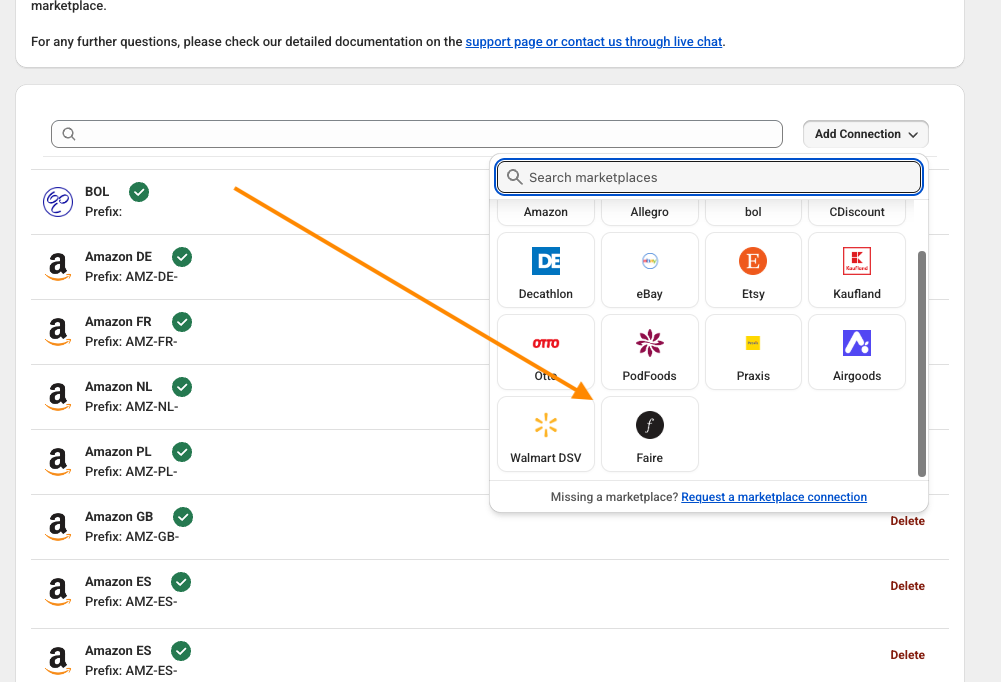
To add a Faire connection to the Marketplace Order Connector, go to the settings page in the app and choose “Add Connection”.
Step 1 - Add the connection
Add connection like in this image
Step 2 - Connect to your Faire account
When the connection is added you will see a pop-up window where you can add your account information.

Enter the required fields:
- Name (the name of this connection)
- API Key (the Faire API Key)
The optional settings can specify how you want to set up the connection
- Prefix (This value will be prefixed to the order number)
- Tags (These tags will be attached to the Shopify orders)
Click ‘Save’ when you’re done.
The app will now establish the connection with your Faire account.
Was this article helpful?
Thanks for your feedback!